Mobile desktop
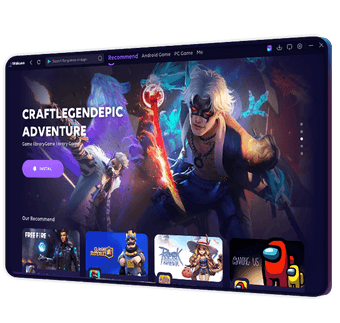
Wakuoo is a free Android emulator for desktop that runs mobile applications and games. This virtualized system allows software to be installed, launched, and managed through an interface. The platform supports game libraries and maintains sessions through local profiles. Core components include virtualization, library management, and input mapping systems that translate peripherals into Android commands.
Top Recommended Alternative

Wakuoo also operates by rendering mobile graphics in a resizable window while handling background processes such as app installation, storage allocation, and session persistence. The utility integrates account sign-in handling for Android services and maintains separate instances for installed applications without altering the host operating system.
Optimized input mapping
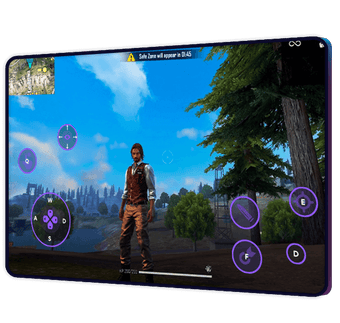
Wakuoo includes a control configuration layer that converts desktop input into touch-based Android actions. The custom control mapping system allows keys, mouse buttons, or controller inputs to be assigned to on-screen gestures such as taps, swipes, or multi-touch actions. These mappings are stored per application and loaded automatically when an app is launched. The system supports multiple layouts for different game genres without altering the Android app itself.
The emulator provides an application environment that mirrors standard Android behavior, with a feature set focused primarily on gaming workflows, though it lacks integrated app development or debugging tools. Through multi-instance support, it can run separate Android sessions simultaneously, each with its own installed apps and settings. Instances function independently, allowing parallel execution without shared session states. This structure is managed through an instance panel that handles creation, duplication, and launch of Android profiles.
Graphics handling is managed through a rendering pipeline that adapts mobile visuals to desktop display modes to ensure smooth performance across various high-definition computer monitor setups. The display rendering engine adjusts resolution, orientation, and scaling while maintaining Android’s interface rules. Applications can switch between portrait and landscape modes dynamically, with the emulator recalculating input zones and visual boundaries to match the selected orientation.
Virtual play
Wakuoo includes Android virtualization, configurable input translation, multi-instance execution, and desktop-based rendering of mobile applications. Its feature set focuses on running Android games and apps within isolated sessions while preserving standard Android behaviors. Limitations include dependence on predefined Android system images and the absence of native development or debugging tools commonly found in Android SDK environments, which limits its utility for professional app developers.